







The best email automation tools for developers, compared

Contents
Most email automation tools are marketed at – surprise, surprise – marketers.
But there's more to life than engagement emails; sometimes you need to send a weekly error digest, an onboarding nudge, or an alert that kicks off an agent. And sometimes there's just no marketing hire yet, so the job lands on whoever's closest to the code.
Either way, if you're a developer, this list is for you – ranked by how the tools actually fit product and engineering work.
There's no wrong answer here, the right pick comes down to what you care about most:
- If you want emails triggered by product events, cohorts, and more: PostHog
- If you need to connect email to a huge catalog of SaaS apps: Zapier
- If you want a visual builder for complex branching automations: Make
- If you need self-hosting and code when prebuilt nodes fall short: n8n
- If you run dedicated lifecycle marketing campaigns: Customer.io
- If you want marketing and transactional across email, SMS, and WhatsApp: Brevo
What's the best email automation tool for developers overall?
For product-led teams, it's PostHog Workflows.
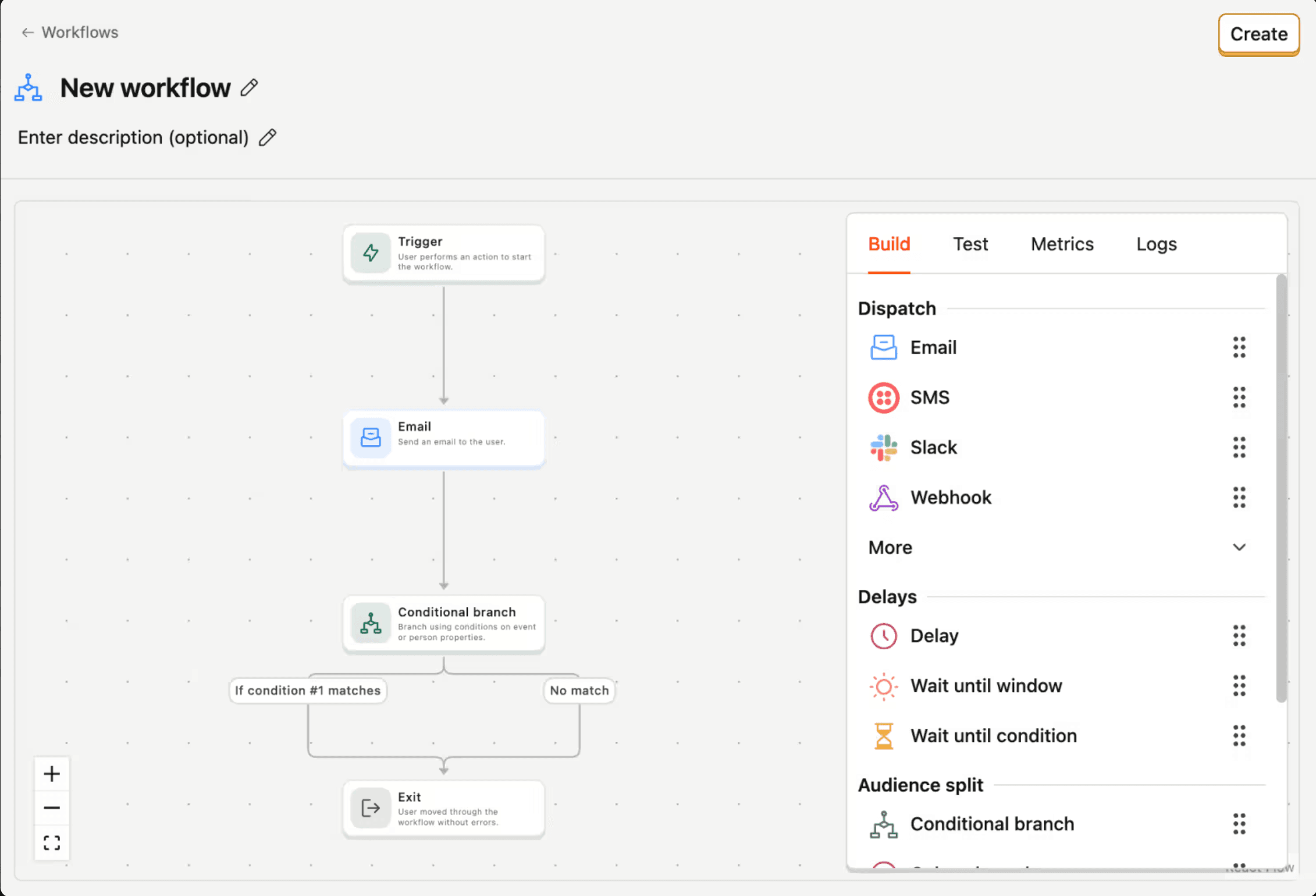
It's a no-code, drag-and-drop builder that runs on the events and person properties already in your PostHog project (no separate marketing dataset) so you can email everyone who finished onboarding or landed in a behavioral cohort, for example.
Add delays and audience splits, and because it all lives next to your analytics, you can check what recipients did before and after the send without reconciling two datasets.
And you're not stuck in the UI: build and edit workflows in code through the PostHog CLI or the MCP server, so a workflow can live in version control and ship alongside the rest of your changes.
A few workflows we actually run at PostHog:
- Weekly error digest email. A webhook sends one digest per recipient, and the workflow renders it with Liquid: total exceptions with a bar chart, crash-free session rate, and top and new issues with sparklines – plus a nudge with the exact wizard command when stack traces aren't symbolicated.
- Post-merge feedback email. When a developer merges the pull request our setup wizard opened, a workflow emails them to ask how the wizard went.
- Broken CI → an agent. When CI goes red on the main branch, a workflow starts an AI agent task that reads our CI-debugging playbook and replies in the alert thread with a verdict, the failing job, and the next step for a human (it's not allowed to re-run CI or push code) – then a later step flips a physical alert light in the office on, and a companion workflow turns it off when CI is green again.
- Infra alert triage. A new firing alert kicks off a focused AI investigation and posts the findings back into the thread that raised it.
What makes PostHog Workflows good for developers:
- Triggers: Product events, webhooks, batches (audience = person properties, cohorts, or distinct IDs), and tracking pixels.
- Channels: Any dispatch step – email, SMS, push (iOS/Android), webhook, or any CDP destination; a webhook step can call out to anything else you run, so email is just one of them
- Hosting: PostHog Cloud
- Pricing: 10,000 emails/month free, then $0.003/email with volume discounts
- License: PostHog core is open source (MIT); Workflows itself is a managed cloud product
Not ideal if: PostHog doesn't already receive your product events, or you need polished multi-channel campaign management for a dedicated lifecycle-marketing team.
Alternatives to consider: Customer.io or Brevo for deep lifecycle campaigns; n8n if self-hosting is the deciding factor; Zapier for a bigger catalog of app integrations.


Get your product events flowing, then automate on them
The setup wizard instruments PostHog in one command so your events are ready to trigger workflows.

What's the best email automation tool for connecting SaaS apps?
Zapier is the pick when email delivery has to plug into a wide mix of SaaS tools. Its catalog runs to thousands of app integrations, and webhooks let your app kick off a Zap when there's no native trigger.
What makes Zapier good for developers:
- Triggers: App events, schedules, polling, and webhooks (webhooks need a paid plan)
- Channels: Email through connected services like Gmail or Mailchimp; SMS and others via their providers
- Hosting: Cloud only; mostly no-code, but Code by Zapier adds Python and JavaScript steps
- Pricing: Per task; free plan covers 100 tasks/month and two-step Zaps; paid plans from ~$19.99/month billed annually
- License: Proprietary SaaS, no self-hosted version
Not ideal if: emails need to respond directly to product events, cohorts, flags, or experiments without first copying that data into connected apps, or one platform already holds your product data and messaging logic.
Alternatives to consider: Make for a more flexible branching builder; n8n for self-hosting; PostHog Workflows for product-led automation.
What's the best email automation tool for complex branching workflows?
Make is the pick when your automation needs several branches, filters, and data transformations you want to see on one canvas. Its non-linear builder shows the whole path at once: routers split records into branches, filters decide which records continue.
What makes Make good for developers:
- Triggers: Native app events, scheduled runs, HTTP requests, and webhooks
- Channels: Email and messaging through app connectors
- Hosting: Cloud only
- Pricing: Per module execution (a credit); free plan includes 1,000 credits/month; paid from ~$9/month billed annually for 10,000 credits
- License: Proprietary, no self-hosted edition
Not ideal if: you need self-hosting, native product-analytics triggers, or you need cost to track message volume rather than workflow shape – credits are consumed per bundle processed, so one record across many modules costs more than a simple linear run.
Alternatives to consider: PostHog Workflows for automation tied to product behavior; n8n when self-hosting takes priority.
What's the best self-hostable email automation tool?
n8n is the pick when you want to host the automation platform yourself and drop into JavaScript or Python when prebuilt nodes fall short. Its self-hosted Community Edition removes execution caps – but you own deployment, updates, backups, and uptime.
What makes n8n good for developers:
- Triggers: Webhooks, schedules, and app events
- Channels: Integration nodes and HTTP requests to email providers, chat apps, databases, and other APIs
- Hosting: n8n Cloud or self-hosted Community Edition (commonly via Docker)
- Pricing: Cloud from ~20€/month; Community Edition has no software charge (you pay for hosting)
- License: Fair-code, source-available – inspect and self-host it, but you can't resell it as a competing hosted service
Not ideal if: you want polished lifecycle campaign management, built-in audience analytics, or a managed tool that needs no infrastructure work.
Alternatives to consider: PostHog Workflows for automation from product events, cohorts, and flags; Zapier for managed app-to-app automation with a larger catalog.
What's the best email automation tool for lifecycle marketing?
Customer.io is the pick for dedicated lifecycle campaigns built around audience segments and real-time behavior, with A/B testing and analytics across email, push, and SMS.
What makes Customer.io good for developers:
- Triggers: Real-time behavioral events and segment membership
- Channels: Email, push, SMS, and in-app messages
- Hosting: Cloud only
- Pricing: Subscription start at $100/month per 5k profiles
- License: Proprietary SaaS, no self-hosted option
Not ideal if: you mainly want lightweight app-to-app automation, self-hosting, or a low-cost way to test a few simple workflows – and it needs engineering work to connect product data and keep event pipelines current.
Alternatives to consider: n8n when self-hosting matters, Zapier for integration breadth, or Brevo for marketing and transactional sending in one service.
What's the best email automation tool for multi-channel marketing and transactional sending?
Brevo is the pick for small and midsize teams that want marketing campaigns and transactional messages in one service, with email, SMS, WhatsApp, chat, and transactional APIs built in.
What makes Brevo good for developers:
- Triggers: Scheduled runs, email activity, website activity, and form submissions
- Channels: Email, SMS, WhatsApp (professional tier), chat, Facebook Ads, and transactional email via API, SMTP, or webhooks
- Hosting: Cloud only
- Pricing: By send volume; free plan ~300 emails/day and 2k contact limit for automations; Starter ~$9/month, Standard ~$18, Professional ~$499; SMS and WhatsApp use separate credits
- License: Proprietary SaaS, no self-hosted option
Not ideal if: you need US data hosting, self-hosting, or workflows triggered directly by your product. Brevo does have an enterprise tier, but no US hosting option.
Alternatives to consider: Customer.io for deeper lifecycle campaigns; PostHog Workflows for automation driven by existing product events.
Other frequently asked questions
How is PostHog Workflows different from a marketing automation tool?
A marketing tool centers on campaigns, contacts, and audiences, and needs your product data copied in before it can act. PostHog Workflows reacts directly to behavior inside your product – it uses the events, cohorts, feature flags, and experiment results already stored in PostHog, with no separate marketing dataset to sync.
It's also part of a self-driving product: because the trigger and the destination are decoupled, a workflow can route to an email or an AI agent task that reads a playbook and acts. The same engine that emails a user about onboarding can kick off an investigation when CI breaks.
Can you use PostHog Workflows for things other than email?
Yes – email is just one step type. The trigger can be a webhook, a product event, or a Slack message, and the destination can be an email, an HTTP call, or an AI agent task. Teams use it for weekly error-digest emails, post-merge feedback, CI-failure triage that hands off to an agent, and alert investigations that report back into the originating thread.
Which email automation tools offer free plans?
PostHog Workflows includes 10,000 emails/month free. Zapier (100 tasks/month), Make (1,000 credits/month), n8n (free self-hosted Community Edition), and Brevo (~300 emails/day) all have free tiers too. Compare each allowance against your expected sends and workflow runs, since a low entry price can climb fast when several meters grow together.
Which email automation tools support self-hosting or open source?
n8n is the self-hosting pick – its source-available Community Edition runs on infrastructure you control (you take on deployment, security, and maintenance). PostHog's core is open source, but PostHog Workflows runs as a managed cloud product. Zapier, Make, Customer.io, and Brevo are all proprietary, cloud-only.
Should I choose a product-led workflow tool or a marketing automation platform?
Let your primary trigger source decide. If actions should fire from product behavior you already track, a product-led tool like PostHog Workflows fits. If your work centers on campaigns, contacts, and audience management, Customer.io or Brevo serve dedicated marketing teams with deeper lifecycle tooling.

Subscribe to our newsletter
build mode
Read by 75,000+ founders and builders
We'll share your email with Substack
PostHog is the leading platform for building self-driving products. With a full suite of developer tools – AI observability, product analytics, session replay, feature flags, experiments, error tracking, logs, and more – PostHog captures all the context agents need to diagnose problems, uncover opportunities, and ship fixes. A data warehouse and CDP tie it all together, unifying that context into one source agents can read across. You can steer it all from Slack, the web app, the desktop (PostHog Desktop), or your own editor via the MCP.